Uploading Documents via API
Use the File Upload API to submit files for accessibility processing from your own system or app.
🔹 Upload Endpoint
POST /v1/external/user/files
📦 Request Body Example:
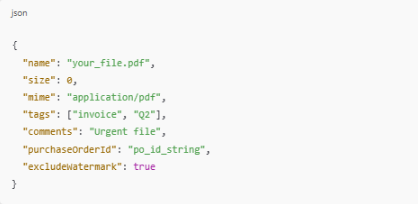
📝 Fields Explained:
-
name, size, and mime are required
-
tags and comments are optional
-
purchaseOrderId can be added if uploading under a purchase order
-
excludeWatermark lets you skip the accessibility icon if allowed
✅ Response Example:


Finally, in order to upload the file you will need toget the Upload URL from the previous API and then upload file to it.
Related Articles
Uploading Documents for Processing
You can upload documents directly to the AccessibleDocs platform for automatic processing. Steps to Upload a Document: Go to the Upload Page: Click “Upload Documents” from the sidebar. Choose Your Files: Click “Choose Files” or drag and drop files ...
How to Generate Your API Key
To use the API, you’ll first need to generate your API key. Steps: Go to Settings > API Integration Under Generate API Key, click Generate API Key Your key will appear in the field — click Copy to use it in your system Use this key in your API calls ...
Using Webhooks to Get Document Status Updates
? Get Automatic Updates When Your Document Is Ready Want to receive real-time updates when your documents are processed? Use webhooks to automatically notify your system when a file is complete. ? Generate Your Webhook Secret Key Go to Settings > ...
Retrieving & Downloading Files with the API
? Search, View, and Download Documents After uploading, you can use the API to list, inspect, and download files. ? Get All Files (Company Admins) GET /v1/external/admin/company/files Supports filters like: users (array of user IDs) tags, search, ...
Deleting Uploaded Documents
If you no longer need a document, you can permanently delete it. Ways to Delete Documents: ? From Upload Documents Tab Select the files → Click “Remove” → Confirm deletion. ? From My Documents / Company Documents Navigate to “Company Documents” → ...